Custom Search

วันอาทิตย์ที่ 10 มกราคม พ.ศ. 2553

remove 'Welcome to the Frontpage' title in Joomla! 1.5


Navigation
Previous • Table of Contents • Next

If you install new Joomla! 1.5 on your server, you get the 'Welcome to the Frontpage' title on your Frontpage. Sometimes, it is difficult to find, where you can change this title.

Go to your Joomla! 1.5 Administration site and login. In your administration site go to:
แก้ที่ back office นะคับ
* Menus - Main Menu (now you are in: Menu Item Manager: mainmenu).
(ไปที่เลือกที่ main menu)
* Click on 'Home' link to edit this link (you are now in: Menu Item: Edit).
(เลือก home)
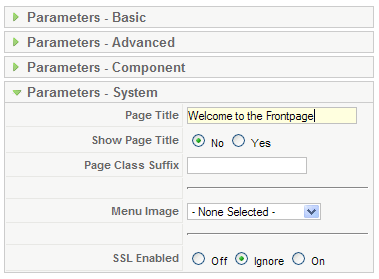
* Click on Parameters System and change or delete the Page title.
(เลือก Parameters System ที่ด้านขวามือตามรูป แล้วก็แก้ไขตามต้องการเลยจ้า )

o If you change the Page title, changed title will be displayed on your Frontpage as a title.
o If you delete the Page title, Menu link will be displayed on your Frontpage as a title (in the present case 'Home' will be displayed as title, because 'Home' is the name of the link to the Frontpage).
o If you don't want to display any title, set Show Page Title below Page title parameter to 'No'.
* Don't forget to save changes.

ปล. อย่าลืม save นะจะ
ที่มา http://www.phoca.cz/documents/16-joomla/167-welcome-to-the-frontpage-remove

วันพฤหัสบดีที่ 7 มกราคม พ.ศ. 2553

หัดทำเว็บไซต์ ตอนที่ 2 เรียนรู้ html พื้น ๆ ด้วย notepad

จากตอนที่ 1 ได้เคยเล่าไปแล้วว่า การเริ่มจาก dream อาจจะยุ่งยากกะการทำความเข้าใจ tool ของมัน คราวนี้มาลองใช้ tool ที่คุ้นเคยกันเลยครับ ผมจะขอกล่าวเฉพาะฝั่ง windows os แล้วกัน tool ตัวนั้นมันก็คือ notepad นั่นเองไม่ต้องลงโปรแกรมอะไรเป็นพิเศษ มันจะมากะ windows เลยคับ ลองทำตามเลยนะ

1.Start->All Programs->Accessories->Notepad
2.พิ่ม code ภาษา html เข้าไปเลยตามนี้


3.save ไฟล์เป็น .html
4.ลองใช้ browser(Internet Exploer,firefox,etc..) เปิดไฟล์ที่ save ไว้ดูนะครับ

ก็เป็นอันสำเร็จการสร้าง เวปเพจง่าย ๆ โดยเครื่องมือที่มีอยู่อย่างจำกัด ผมแนะนำเพิ่มเติมนะครับ ควรจะทำบ่อย ๆ และหาหนังสืออ่านเกี่ยวกับ tag html แยะ ๆ จะได้จำได้นะครับ

ดูดวงจากกราฟ ปี 52 53 54

ดูดวงจากกราฟ ปี 52 53 54 แม่นไม่แม่น download ไปดูเองเลยครับผมรับรองไม่ผิดหวัง

http://www.ziddu.com/download/5033752/Life-graph.rar.html

compaq V37xxAU driver

โหลดไปดูเอาเองจ้า

http://www.ziddu.com/download/2986136/V37xxAU.pdf.html


เพิ่มเติม สำหรับ รุ่น V3723AU หากลง xp wirless driver ไม่ตรงนะคับต้องโหลดตัวนี้ sp37950

http://www.ziddu.com/download/2991956/sp37950.exe.html

วันพุธที่ 6 มกราคม พ.ศ. 2553

convert สีจาก html เป็น System.Drawing VS2005

หลายท่านที่เขียนเว็บ c# ด้วย visual studio อาจเคยประสบปัญหาใช้รหัสสีกับ component ไม่ได้
มีวิธีง่าย ๆ ดังนี้
1.ใช้ using System.Drawing;
2. แล้วก็เรียกใช้แบบนี้เลยจ้า
Color col= System.Drawing.ColorTranslator.FromHtml("#DCD2C2");
3.ต่อไป component ต่าง ๆ ของ web.ui ก็สามารถใช้สีได้ละ
เช่น
component.bgColor=col;

การใช้ confirm box ใน web ด้วย c#

หลายท่านอาจเคยประสบปัญหาเวลาเขียน software Aplication เราจะใช้พวก box ต่าง ๆ ได้ง่าย ๆ เพราะส่วนมากจะเป็น component ที่พร้อมใช้ได้เลยเช่น Messagebox งง 555

เอาเป็นว่ามาพูดถึงการเขียน web กันเลยดีกว่า
ถ้าเราจะ click ปุ่มเพื่อให้ไปทำอะไรสักอย่างอะคับแต่เราจะทำ confirm box ก่อนที่จะไปทำจริง ๆ (confirm box ก็คือประมาณว่า ตกลงจะทำใช่หรือไม่แล้วให้เลือก yes ทำ หรือ no ก็ไม่ทำ)

ใช้คำสั่งนี้เลยคับเอาไว้ใน Page_Load ละ
controlid.Attributes.Add("onclick", "return confirm('คุณมั่นใจแล้วว่าจะลบ Record นี้?');");

วันอังคารที่ 5 มกราคม พ.ศ. 2553

พยาบาล สะท้านใจ(วันที่รู้แฟนท้อง)

หลังจาก อาการแปลก ๆ ของแฟนได้เกิดขึ้นก็คือ เวียนหัวบ่อย ๆ เหม็นอาหาร คลื่นใส้ ก็เลยพาไปตรวจที่ รพ.เปาโล แถว ๆ โชคชัย 4นั่งรออย่างใจจดใจจ่อ ว่าผลจะออกมาว่าอย่างไร ในที่สุดพยาบาล 2-3 คนก็ถือแฟ้มแพคเกจต่าง ๆ สำหรับการฝากครรภ์มาให้แล้วก็บอกว่ายินดีด้วยนะคะว่าที่คุณพ่อคนใหม่ โอ้โหตอนนั้นจิตใจไม่อยู่กะร่องกะรอยคับ ทำงานก็อยู่ในช่วงลองโปร เงินเก็บก็แค่หยิบมือ แต่ก็ดีใจนะครั้งแรกในชีวิตที่ได้รู้ว่าจะได้เป็นพ่อคนแล้ว งืมๆ ..